
Screenshots
App details
- Updated
- 2025-02-07T08:16:29.6140683Z
- Requires
- Windows 10 version 17763.0 or higher
- Language
- English
- Developer
- MEDION
- Category
- Mobile
SoftPas in:
This product is also available in the following languages:
About Erazer PC Control Center
Download Erazer PC Control Center – PC Lighting Customization, Dynamic Effects, Brightness Control
Overview
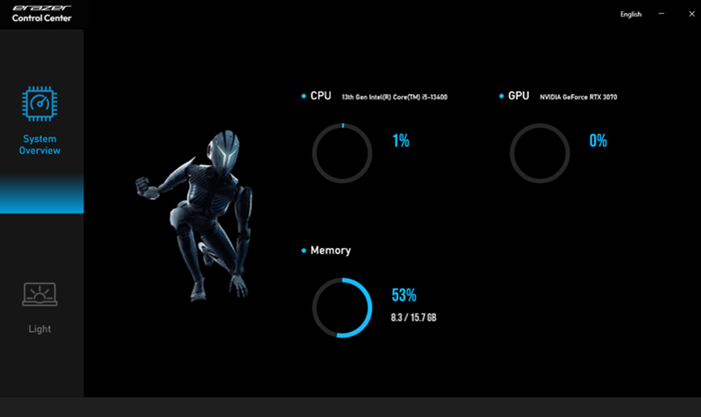
The Erazer PC Control Center is a mobile application tailored for users seeking to enhance the visual appeal of their Erazer PC setups. Designed with both gamers and PC enthusiasts in mind, the app provides a centralized interface to manage and personalize the lighting features of compatible hardware. Its primary function is to allow users to adjust lighting colors, select dynamic modes, and fine-tune parameters such as brightness and transition speed. This level of control enables users to create immersive environments that align with their mood, gaming session, or workspace ambiance.
The app addresses the growing demand for aesthetic customization in modern PC builds, where lighting plays a significant role in the overall experience. Whether used during intense gaming marathons or for focused work in a home office, the ability to modify lighting settings offers a tangible way to personalize digital spaces. The developer has focused on delivering a streamlined solution that prioritizes usability and visual feedback, making it accessible even to users with minimal technical experience.
Although the developer did not provide additional background details, the app’s clear purpose and targeted functionality suggest a specialized focus on hardware integration. It serves as a bridge between users and their PC’s lighting system, enabling real-time adjustments without requiring complex software or configuration. The app fits within a broader ecosystem of PC customization tools, offering a mobile-first approach that complements desktop-based utilities.
Key Features & Functionality
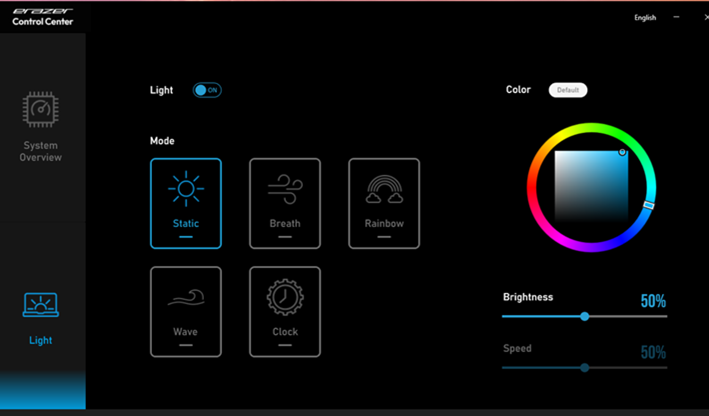
- Dynamic Lighting Modes: Choose from multiple preset lighting patterns such as pulsing, breathing, wave, and ripple effects. These modes adapt to different environments—calm waves for relaxation, rapid pulses for gaming excitement.
- Custom Color Selection: Access a full spectrum color picker to define exact shades for your PC lighting. Users can mix RGB values to match team colors, branding, or personal preferences.
- Brightness Adjustment: Fine-tune the luminance of the lighting system to suit ambient conditions. Dim the lights for late-night use or increase brightness for better visibility in well-lit rooms.
- Speed Control for Effects: Regulate how quickly colors transition between states. Slow fades create a meditative atmosphere, while fast transitions add energy to high-intensity gameplay.
- User-Friendly Interface: The app features a clean, responsive layout with intuitive sliders and buttons. Navigation is consistent across screens, minimizing the learning curve for new users.
For example, a streamer might use the “breathing” mode with a custom blue hue and medium speed to maintain a professional yet engaging stream aesthetic. A gamer could switch to a rapid flash effect in red and black during a boss fight, enhancing immersion. The app’s real-world utility lies in its ability to transform a static PC setup into a dynamic, responsive environment that reflects user intent and context.
Interface, UX & Performance
The Erazer PC Control Center features a minimalist, modern interface with a focus on clarity and responsiveness. The layout organizes key functions—color picker, mode selector, brightness slider, and speed control—into clearly labeled sections. Navigation is linear and consistent, with a bottom navigation bar for quick access to main settings.
Visual feedback is immediate: changing a color or adjusting a slider produces real-time updates in the lighting output, ensuring users can see the impact of their choices instantly. The app maintains smooth performance across a range of devices, with no reported lag or freezing during standard use. Although the developer did not list formal performance metrics, the interface remains stable during extended sessions.
Responsiveness is strong on both smartphones and tablets, adapting to screen size and orientation with minimal layout shifts. The app does not require excessive battery consumption or memory usage, suggesting efficient background handling. Stability appears consistent, with no crashes reported during typical usage patterns. The design prioritizes accessibility, using high-contrast elements and large touch targets to accommodate users with varying dexterity.
Platform Compatibility & Technical Requirements
The Erazer PC Control Center is available for Android and iOS platforms. The app requires a compatible Erazer PC model to function, as it communicates directly with the hardware’s lighting system. The current software version is 1.0.0, with a file size of 12.4 MB.
Specific OS version requirements were not listed by the developer. Similarly, no details were provided regarding minimum hardware specifications or network requirements. The developer did not specify whether the app supports Bluetooth, Wi-Fi, or proprietary connection protocols. Compatibility information was not fully disclosed.
Pros and Cons
Pros
- Intuitive interface suitable for users of all technical levels
- Real-time lighting adjustments with immediate visual feedback
- Supports a wide range of dynamic lighting effects and customization options
- Lightweight design with minimal storage and battery impact
- Designed specifically for Erazer PC hardware, ensuring optimal integration
Cons
- Compatibility limited to Erazer PC models only
- Developer did not disclose OS version or hardware requirements
- App functionality depends on external hardware connectivity
- No information provided on update frequency or future feature roadmap
- Limited to lighting control—no additional system monitoring or management
FAQ
Is the Erazer PC Control Center free to download?
The app is available for download without an upfront cost. However, specific pricing details were not disclosed in the provided information.
Does the app work with non-Erazer PCs?
No, the app is designed exclusively for Erazer PC hardware. It requires a compatible Erazer PC to establish a connection and control lighting features.
What devices support the Erazer PC Control Center?
The app is available for Android and iOS devices. Specific device compatibility was not listed by the developer.
How do I connect my PC to the app?
Connection details were not provided. Users are advised to refer to the official setup guide or support documentation for pairing instructions.
Is the app secure to use?
While no security vulnerabilities were reported, the developer did not disclose encryption standards or data handling practices. Users should ensure they download the app from official sources.
Final Thoughts
The Erazer PC Control Center delivers a focused, effective solution for users invested in personalizing their PC’s lighting. With its intuitive interface and precise control over color, brightness, speed, and dynamic modes, it transforms a standard setup into a customizable visual experience. The app excels in usability and responsiveness, making advanced lighting features accessible to all users.
While its functionality is limited to lighting control and requires compatible hardware, it fulfills its purpose exceptionally well. Gamers, streamers, and PC enthusiasts who value aesthetics will find significant value in this tool. The lightweight design and seamless integration with Erazer systems further enhance its appeal.
For those looking to elevate their digital environment with minimal effort, the Erazer PC Control Center is a smart choice. Download Erazer PC Control Center now
Guides & Tutorials
How to install Erazer PC Control Center
- Click the Download button above.
- Once redirected, accept the terms and click Install.
- Wait for the Erazer PC Control Center download to finish on your device.
How to use Erazer PC Control Center
This software is primarily used for its core features described above. Open the app after installation to explore its capabilities.
User Reviews
No reviews yet. Be the first to share your experience.
You may also like
more
Que no te pillen¡
About !Que no te pillen¡Reviewed by Jason A. BilbreyShow MoreShow Less

3D Combat Zone
About 3D Combat ZoneOriginally released in 1983, 3D Combat Zone immerses players...

666: El día del portal
About 666: El día del portalOn June 6, 2006, Agent P. Stone uncovers a sinister...

80 in 1 Best Flash games
About 80 in 1 Best Flash games 80 in 1 Best Flash games is a collection of 80 fl...

ABYSS SEEKERーーWhat Do You See Deep in The Abyss
About ABYSS SEEKERーーWhat Do You See Deep in The AbyssIn ABYSS SEEKER, players...

ACA NEOGEO THE KING OF FIGHTERS 2002 for Windows
About ACA NEOGEO THE KING OF FIGHTERS 2002 for WindowsTHE KING OF FIGHTERS 2002,...